XLIT
I originally wrote Xlit in response to a friend's request for a program that
would allow ad hoc transliterations to be defined in a simple fashion. The ability
to restrict application of the transliteration to specified regions was added
later. In some ways, though, that is its most useful feature, one that one would often
like to have for other programs. Xlit has now been extended to allow the transliteration
to be performed either by an external command or by a plugin written in Tcl.
You can now use Xlit to apply a sed or perl script, or a specialized standalone
transliterator such as
BuckwalterToUnicode,
only to specified regions.
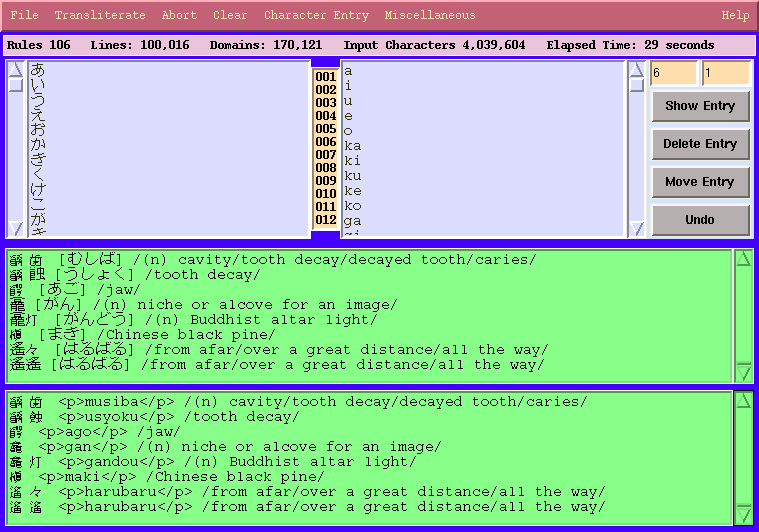
Xlit is a program for transliterating text, that is, for converting text from
one writing system into another. It allows the user to define a transliteration simply
by typing the input strings in one window and the strings to which they are to be mapped
in another. This makes it suitable for use for dealing with non-standard transliteration,
such as those often necessary between the language notes made by a missionary, trader,
or other amateur and technical linguistic notation, or between linguistic notation
and a practical writing system.
xlit also provides some advanced facilities not found in typical transliteration and
encoding conversion programs. It is often necessary to restrict transliteration to
particular parts of the text. xlit understands a variety of delimiters and if so
instructed will transliterate only the regions enclosed by the specified delimiters or
only their complements. It can also convert one type of delimiter to another.
xlit input and output is in UTF-8 Unicode. At present, it is limited to the
Basic Monolingual Plane (the first 16 bits) because the language in which it is written,
Tcl/Tk, only supports the BMP. Once Tcl/Tk supports full Unicode, so will xlit.
A number of tools are provided to facilitate the development of transliterations.
There are popup windows for entering International Phonetic Alphabet characters and
other phonetic notation and a widget for entering Unicode characters by codepoint
where necessary. A variety of tools are provided for search and movement within the
various windows.
In some situations it is desirable to present a transliteration together with the
original version rather than replacing the original with the transliteration.
xlit can be configured to do this. The user may choose whether the untransliterated
copy precedes or follows the transliteration and how, if at all, the untransliterated
copy should be delimited.
Xlit can read and write transliteration definitions in its own format and as Yudit keymap
definitions and can be run in batch mode without the GUI.
You can read the reference manual (a web page with lots of screenshots) here.
A copy is included with the program.
Xlit should run anywhere that Tcl/Tk is available. It has been successfully tested
on GNU/Linux, FreeBSD, SunOS, Mac OS X, and MS Windows 2000. However, note that
on FreeBSD tclsh is not a link to the most recent version of tclsh but a shell
script that explains that the version number must be supplied and exits.
On FreeBSD, it is therefore necessary either to invoke xlit indirectly, as an
argument to tclsh, e.g. tclsh8.4 xlit ... or to edit xlit and replace
tclsh in the fourth line with tclsh8.4 (or whatever the current
version is).
Note: the need for Tk.
The Tk and Iwidgets packages are needed for the normal operation of the program, that is, with
the graphical user interface. They are not needed if the program is run in batch mode.
In batch mode it is sufficient to have the pure Tcl environment provided by tclsh.
Note: obtaining the necessary Tcl/Tk environment.
The GUI requires both the basic Tcl/Tk distribution and the iwidgets library.
If you already have Tcl/Tk and just need to add iwidgets, you can obtain the
package from the Sourceforge project
site.
On the download page you will find source and binary packages
for both [incr Tcl/Tk], which is the basic part of this package, and [incr widgets],
which is the part that contains the widgets. You will need to install both.
(iwidgets is an alternative name for [incr widgets].)
The easiest way to obtain the Tcl/Tk environment you need is to install the
ActiveTcl
distribution from ActiveState.
This distribution provides the Tcl language, the Tk graphics library, and a bunch
of extensions, including [incr tcl] and [incr widgets].
Don't be concerned by the fact that ActiveState is a commercial outfit.
The Tcl/Tk distribution that they provide is free as in both beer and speech.
They make their money selling services and programming tools. The ActiveTcl
distribution is currently available for: GNU/Linux, HP-UX, AIX, Solaris, Mac OS X,
and MS Windows.
For FreeBSD, Tcl and Tk are available at:
Xlit-2.3.tgz
Xlit-2.3.tbz
Xlit.zip
If you would like to be notified of new releases, subscribe
to xlit at
Freshmeat.
Version 2.3
- Configuration files that load plugins now work properly with the GUI.
- Configuration files generated by xlit's Save Configuration command,
which contain commands related to the GUI, no longer trigger errors when read in batch mode.
- The popup for inserting accented letters has been improved, with more
characters and upper case versions of the letters available on a right button press.
- The number of columns in the accented character widget can now be set from the
initialization file using the command AccentedLetterColumns.
Version 2.2
- A bug was fixed in which xlit attempted to popup an error alert when running in batch mode without the GUI.
- Plugins are now permitted to write to stderr so as to emit error messages.
- The number of parse errors encountered is now reported.
Version 2.1
- Plugins are now executed in a safe interpreter, which prevents them from writing files
and performing other insecure operations.
Version 2.0
- It is now possible to specify that the transliteration should be performed by an external
command.
- It is now possible to specify that the transliteration should be performed by a plugin
written in Tcl.
Version 1.10
- The init file command DuplicateSelection now accepts a wider range of arguments including
some abbreviations.
- A bug was fixed in which xlit incorrectly claimed not to have found any embedded regions
when the parse type was Unpaired Single Character
- A bug was fixed in which the right delimiter was not emitted when delimiting the
output or deuplicate when the parse type was Unpaired Single Character.
Version 1.9.2
- This version contains a workaround for a bug in the MS Windows implementation of
Tcl that triggers an error on startup when the font control panel is created. (The
bug is that Tcl fails to recognize 0xFF as a hexadecimal number.)
Version 1.9
- An initialization file command DefineShortcut has been added that allows the user to define
keyboard shortcuts.
- Attempts to transliterate when no transliteration has been defined or when
there is no text to transliterate are now trapped.
- The Help menu has been reorganized and the menu buttons for the various popups
made into toggles.
- Bugs in the Save Configuration command were fixed.
- Some cosmetic improvements have been made.
Version 1.8
- Validation of codepoints in the popup for entering characters by codepoint has been improved.
The message window is now cleared at the beginning of each attempt to insert a character.
The popup now has a title.
Version 1.7
- Bugs that prevented the various search popups from being created were fixed.
- The time and date of the last modification are now added to the version
number in the window title and the About and BugReports popups.
- The syntax of calls to the trace command was modernized in view of the deprecation
of the original syntax.
Version 1.6.1
- Added the missing subroutine ScaleMoveBigIncrement, without which right-clicking
on scales triggered an error.
- Added the missing subroutine BindInsertionTarget, without which the character insertion
tools would not insert characters into the font control panel example boxes.
- A bug in the insertion of domain separators on output that put an extra one at the
end of the text was fixed.
- "Unpaired Delimiters" and "Unpaired Characters" were renamed "Separator Character" for clarity.
Version 1.6
- It is now possible to run the program in batch mode, without the GUI.
In fact, in batch mode, it is not necessary for Tk or a window system to be present at all
A command line option was added to specify batch mode.
- It is now possible to specify what delimiters to use, if any, on output.
- The requirement that there be at least one transliteration rule was eliminated.
In the absence of any rules, the identity mapping is performed. This makes
sense if the purpose is to change delimiters.
- A command line option was added for specifying the configuration file to read in place
of the usual init file.
- A bug was fixed that made the widget for inserting characters
by their Unicode codepoint insert them into itself.
- A bug was fixed that triggered an error when the widget for
inserting characters by their Unicode codepoint was dismissed.
- A bug was fixed whereby the usage message mis-identified the program.
Version 1.5
- The program can now be configured via an initialization file.
- A command line flag was added for suppressing reading of the initialization file.
- The editing controls are now hidden by default.
- Balloon help was added for the transliteration editing balloons.
- The font control panel was improved.
- Various improvements were made to the character entry widgets. As a consequence,
the format for custom character chart definitions has changed. Old style definitions will not work.
- The Miscellaneous menu has been reorganized.
- The size of the message region is now controlled properly.
Version 1.4
- Added arbitrary paired strings as delimiters and as duplicate delimiters.
- Added entry numbers between left hand side and right hand side.
- Added command line options for specifying transliteration definition
and text to be transliterated.
- Added help popups ExplainXML, ExplainPairedDelimiters, and ExplainUnlimited.
- The Miscellaneous menu was reorganized and some toggles replaced with checkbuttons.
- Clarified menu entries on Clear menu.
- Added help entry on command line options.
- Moved manual to /usr/share/Xlit.
- Updated URLs in help system.
Version 1.3
- Under Mac OS X Xlit now detects that the window/graphics system is Tk-Aqua
and adapts itself.
- Xlit's identification of the operating system has been improved.
- Transliteration files may now include comments.
- Where the number of input lines is not the same on the
two sides of the transliteration, we no longer treat
this as a fatal error. It happens all too easily,
and as things were arranged before, led to a perplexing
declaration that no transliteration was available.
Instead, we ignore the excess lines and pop up a
warning.
- The ability to read Yudit files containing hexadecimal character codes
on the left-hand side has been added.
- Instead of just trying to use the default browser, xlit now
works through a list of browsers, trying each in turn.
- The reference manual has been updated.
Version 1.2
- Replaced the character insertion code with a new version that is cleaner.
The new version also fixes a bug which caused the delete button on the widget
for inserting characters by Unicode codepoint to affect the wrong window under
certain circumstances. Two typos in the glosses for accented characters were corrected.
Version 1.1
- Controls were added for editing the transliteration.
- Xlit can now read and write Yudit .kmap files in addition to its own transliteration file format
- Display of scrollbars is now optional.
- The duplication dialog has been moved to the top level of the Miscellaneous menu.
- The accented character entry widget has been improved.
- Users can now define their own charecter entry widgets.
- An estimate of time remaining is now displayed.
Invocation of a browser from the help system does not work under MS Windows 2000 or Mac OS X.
Back to Bill Poser's software page.